Post

Visualizzazione dei post con l'etichetta Develop

Find Point of Intersection of Two Lines

  pdd LinesIntersection(pdd A, pdd B, pdd C, pdd D) {      // Line AB represented as a1x + b1y = c1      double a1 = B.second - A.second;      double b1 = A.first - B.first;      double c1 = a1*(A.first) + b1*(A.second);          // Line CD represented as a2x + b2y = c2      double a2 = D.second - C.second;      double b2 = C.first - D.first;      double c2 = a2*(C.first)+ b2*(C.second);          double determinant = a1*b2 - a2*b1;          if (determinant == 0)      {          // The lines are parallel. This is simplified          // by returning a pair of FLT_MAX          return make_pair(FLT_MAX, FLT_MAX); ...

Finding points on a line with a given distance

Immagine
Start point - (x0, y0) End point - (x1, y1) We need to find a point (xt, yt) at a distance dt from start point towards end point. The distance between Start and End point is given by d = sqrt((x1 - x0)^2 + (y1 - y0)^2) Let the ratio of distances, t = dt / d Then the point (xt, yt) = (((1 - t) * x0 + t * x1), ((1 - t) * y0 + t * y1)) When 0 < t < 1 , the point is on the line. When t < 0 , the point is outside the line near to (x0, y0) . When t > 1 , the point is outside the line near to (x1, y1) .  

Sort Points by clockwise Angle

Immagine
    Points[4] = {...};     Point origin; ...     // Sort Points by Angles     for(int m=0; m<3; m++)         for (int i = m + 1; i < 4; i++)         {             if (GetClockwiseAngle(Points[i], origin) < GetClockwiseAngle(Points[m], origin);)             {                                SwapPoint(Points, i, m);                }         }         ... double GetClockwiseAngle(Point point, Point origin) {     double angle = 0.0;     angle = atan2(point.Y - origin.Y, point.X - origin.X) * 180 / M_PI;; ...

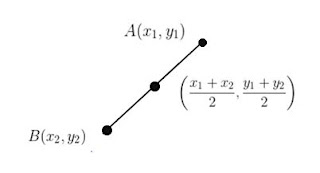
Middle point of a line segment

Immagine
A(x,y) B(x,y) MidAB.X = (A.X + B.X) / 2; MidAB.Y = (A.Y + B.Y) / 2;

Rotate Point Around Origin

//---------------------------------------------------------------------------- void RotatePointAroundOrigin(&Point, Point origin, double angle) {     float s = sin(angle);     float c = cos(angle);     // Translate point back to origin:     point.X -= origin.X;     point.Y -= origin.Y;     // Rotate point     float xnew = point.X * c - point.Y * s;     float ynew = point.X * s + point.Y * c;     // Translate point back:     point.X = xnew + origin.X;     point.Y = ynew + origin.Y; }

Angle between two points

//---------------------------------------------------------------------------- double CalculateAngle(Point point1, Point point2, Point origin) {     double angleToP1 = atan2((point1.X - origin.X), (point1.Y - origin.Y));     double angleToP2 = atan2((point2.X - origin.X), (point2.Y - origin.Y));     double angle = angleToP2 - angleToP1;     if (angle < 0) angle += (2 * vtkMath::Pi());         return angle; }

VTK Textured Map Plane + Image Data

Ref: https://vtk.org/Wiki/VTK/Examples/Cxx/Visualization/TextureMapPlane   Ref: https://vtk.org/Wiki/VTK/Examples/Cxx/Visualization/TextureMapImageData  ...    vtkImageCanvasSource2D *imageSource; vtkNEW(imageSource);     imageSource->SetScalarTypeToUnsignedChar();     imageSource->SetExtent(0, 10, 0, 10, 0, 0);     imageSource->SetNumberOfScalarComponents(3);     imageSource->SetDrawColor(127, 255, 100);     imageSource->FillBox(0, 10, 0, 10);     imageSource->SetDrawColor(20, 20, 20);     imageSource->DrawSegment(0, 0, 9, 9);     imageSource->DrawSegment(9, 0, 0, 9);     imageSource->Update();         texture->SetInput(imageSource->GetOutput());     // Create a plane     vtkPlaneSource *plane; vtkNEW(plane);     plane...

vtk textured polygon

Ref: https://vtk.org/Wiki/VTK/Examples/Cxx/Visualization/TextureMapQuad // Read the image which will be the texture vtkSmartPointer < vtkJPEGReader > jPEGReader = vtkSmartPointer < vtkJPEGReader >:: New (); jPEGReader -> SetFileName ( inputFilename . c_str () ); // Create a plane vtkSmartPointer < vtkPoints > points = vtkSmartPointer < vtkPoints >:: New (); points -> InsertNextPoint ( 0.0 , 0.0 , 0.0 ); points -> InsertNextPoint ( 1.0 , 0.0 , 0.0 ); points -> InsertNextPoint ( 1.0 , 1.0 , 0.0 ); points -> InsertNextPoint ( 0.0 , 2.0 , 0.0 ); vtkSmartPointer < vtkCellArray > polygons = vtkSmartPointer < vtkCellArray >:: New (); vtkSmartPointer < vtkPolygon > polygon = vtkSmartPointer < vtkPolygon >:: New (); polygon -> GetPointIds () -> SetNumberOfIds ( 4 ); //make a quad polygon -> GetPointIds () -> SetId ( 0 , 0 ); polygon -...

Hello world - Progress Bar (Loading...)

Immagine
Vector2 m_Position = {100, 100}; Vector2 m_Size = {400, 20}; Vector2 m_ProgressBar_Size = m_Size; int m_Progress = 0;  // Update m_Progress  m_Progress_Rectangle.setPosition(m_Position);  m_ProgressBar_Size.x = (m_Size.x / 100)*m_Progress;  m_Progress_Rectangle.setSize( m_ProgressBar_Size );  print( "Loading...%d%" , m_Progress); 

Hello world - Game Loop

// Ver.1 - Easy Loop --------------------------------------------------- while( true ) {   processInput();   update();   render(); } // Ver. 2 - Add Time and FPS --------------------------------------------------- MS_PER_FRAME 16 //60 FPS == 16 millisecondi per frame   while( true ) {   double  start  =  getCurrentTime();   processInput();   update();   render();   sleep( start  +  MS_PER_FRAME  -  getCurrentTime ()); }

Hello world - Unity - Code guidelines

Di seguito alcune considerazioni piu’ specifiche sul codice, unity e l’organizzazione del lavoro. Stile, convenzioni indentazione Legenda: Da non fare assolutamente Forse, ma meglio persarci bene Ok Pattern and practices Variabili pubbliche (escluse readonly e const) Iteratori a frame time (sono piu’ lenti e allocano, usate i for a frame time, possibilmente) Over-Engineering (Unity e’ un framework ad altissimo livello. E’ molto raro che vi troviate a scrivere architetture complesse di componenti, almeno in una prima fase. Se sentite la necessita’ di usare tante classi da subito e strutture complesse, con buona probabilita’ esiste una soluzione piu’ semplice, magari gia’ implementata nel framework) Statement e modificatori esotici : GOTO, ref & out parameters, tutte cose che rompono incapsulamento e OOP. Evitare! Reflection: macigno sulle performance, inutile nel 99% dei casi (salvo che scriviate un IDE o un sistema di IoC). Vietatissima [De]Alloc...

Hello world - Unity - Asset import settings best practies

Models Import Settings Negli import settings dei modelli ci sono diverse flag, ovviamente le opzioni variano da modello a modello. L’idea di massima e’ selezionare solo quelle che ci interessano ed evitare di importare qualsiasi cosa non necessaria. Di seguito alcuni esempi: Qui la doc: http://docs.unity3d.com/Manual/FBXImporter-Model.html Read/Write enable : NO a meno che non serva modificare la mesh a runtime.. Import blendshapes: NO Import Materials: NO unity importa i materiali nella stessa cartella dei modelli e genera disordine. Inoltre spesso non e’ in grado di scegliere shader e texture correttamente. Tanto vale farseli a mano cosi siamo sicuri di non sbagliare. Generate Colliders: NO Generate LM UVS: DIPENDE SE STATICI CON LIGHTMAP Optimize Mesh: SI Normals: meglio importarle se il modello le ha, altrimenti farle generare.. di norma servono sempre. Tangents: se le ha importarle altrimenti generarle SOLO SE si usano Bumpmap o simili Rig->...

Hello world - Rimozione delle superfici nascoste - Appunti

Rasterization -  HSR descrivere il problema ed elencare le strategie e quindi gli algoritmi La computazione avviene in aritmetica intera, e le operazioni sono “per pixel” (pixel bound). Non tutti i poligoni sopravvissuti, però, devono essere disegnati. Alcuni possono non essere visibili dall’osservatore perché nascosti (totalmente o parzialmente) da altri poligoni. • Problema: dati un insieme di poligoni in 3D ed un punto di vista, si vogliono disegnare solo i poligoni visibili (o porzioni di essi). Ogni poligono si assume essere piatto ed opaco. • Vi sono essenzialmente due approcci: – object-precision: l’algoritmo lavora sui poligoni stabilendo relazioni di occlusione reciproca. Il costo `e quadratico nel numero dei poligoni. Però la precisione `e elevata (precisione macchina). – image-precision: l’algoritmo stabilisce occlusioni a livello del pixel. `E più veloce ma la precisione `e limitata. • La rimozione delle superfici nascoste (Hidden Surface Removal, HSR) vien...